Secure Card Storage with NeoDeos
NeoDeos Secure Card Storage allows you to securely store credit card information, making it possible to reuse cards across different providers or to reduce your PCI compliance requirements.
You can use the Secure Card Storage in a couple of key ways:
- In combination with payment providers
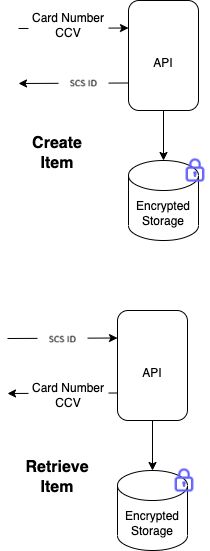
- As a standalone storaging service
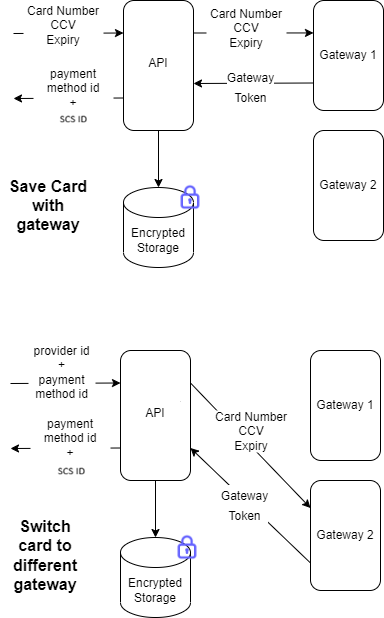
When paired with a provider, the card information is both stored securely in the NeoDeos Secure Card Storage and tokenized by the provider's gateway.
Secure Card Storage Entry Expiration Configuration
You can configure Secure Card Storage entries to expire automatically when they're created. This can be done either after a set number of seconds or at a specific date — but not both.
To expire by duration, use the ExpireSeconds or VaultExpireSeconds parameter (depending on the API call you're using).
To expire at a set date, use ExpireDate or VaultExpireDate.
Handling CVV Data in Stored Transactions
To meet PCI standards, the card security code (Ccv) is deleted after the first transaction using that Secure Card Storage entry or shortly afterward.
Integrating Stored Payment Data with Providers
When using the Secure Card Storage alongside a provider, the card data is saved to the Secure Card Storage and also tokenized with the gateway at the same time.
Standalone Secure Card Storage Usage Without Provider Tokenization
Leveraging the Secure Card Storage in Conjunction with Payment Providers
Any time you tokenise a card, create a customer with a card or a payment method with a Secure Card Storage.
The Secure Card Storage securely stores only PCI-sensitive data—specifically, the card number and, optionally, the CCV. Non-sensitive payment details, such as the card's expiry date, are maintained within the associated payment method record. To generate a new payment method from a stored card, you must supply the providerId, paymentMethodId, and optionally the ccv.
Initializing a Stored Payment Entry
A Secure Card Storage entry can be generated in any scenario where card data is supplied, including but not limited to:
To register a customer while simultaneously securing their card details in the Secure Card Storage:
- curl
curl -d '{"ProviderId":"a26c371f94f640daadd228ec8e9da8ed", "PaymentInformation" : {"CardNumber" : "4111111111111111", "ExpiryDate" : "12/22", "Ccv" : "123"}, "VaultCard" : true}' \
        -H "Content-Type: application/json" \
        -H "x-secretkey: <secret_key>" \
        -X POST https://sandbox-api.neodeos.com/customer/card
Transitioning to a new provider
To initiate a payment method leveraging an existing stored card token:
- curl
curl -d '{"ProviderId":"a26c371f94f640daadd228ec8e9da8ed", "PaymentMethodId" :  "<payment_method_id>"}' \
    -H "Content-Type: application/json" \
    -H "x-secretkey: <secret_key>" \
    -X POST https://sandbox-api.neodeos.com/payment_method/vault
Standalone Secure Card Storage Integration
When initializing a Secure Card Storage entry, including the Card Verification Code (CCV) is optional.
You may configure the expiration of the Secure Card Storage item by specifying either ExpireDate (as a datetime value) or ExpireSeconds (as a relative duration in seconds). Note that only one of these two parameters may be used per request.
Initializing a Secure Card Storage Entry
- curl
curl -d '{"CardNumber" : "4111111111111111", "Ccv" : "123"}' \
    -H "Content-Type: application/json" \
    -H "x-secretkey: <secret_key>" \
    -X POST https://sandbox-api.neodeos.com/vault
Accessing Stored Data
To access an item from the Secure Card Storage
- curl
curl -H "Content-Type: application/json" \
    -H "x-secretkey: <secret_key>" \
    -X GET https://sandbox-api.neodeos.com/vault/<vault_id>
Remove a Secure Card Storage Entry
A Secure Card Storage item can also be manually removed prior to its expiration.
- curl
curl -H "Content-Type: application/json" \
    -H "x-secretkey: <secret_key>" \
    -X DELETE https://sandbox-api.neodeos.com/vault/<vault_id>