Welcome to NeoDeos
NeoDeos offers a unified and simplified approach to integrating with various payment providers through a single API.
Summary
The platform includes several key components:
- Client SDK – securely collects payment information from users
- API – handles backend payment processing. You can explore the full REST API reference here.
- Sandbox Dashboard – used to manage your NeoDeos account, monitor transactions, and handle customer records
Access Control
Access to the API is secured using your Secret Key (for server-side operations) or your Public Key (for client-side interactions). The Secret Key should always remain private. Both keys are available through the Sandbox Dashboard.
To verify access:
- In the Client SDK, use the Public Key during setup
- In the API, include the Secret Key in the HTTP header: x-secretkey
Begin Here
Here’s the simplest way to begin:
- First, use the Client SDK to securely tokenize the payment details
- Then, use the token to complete the payment
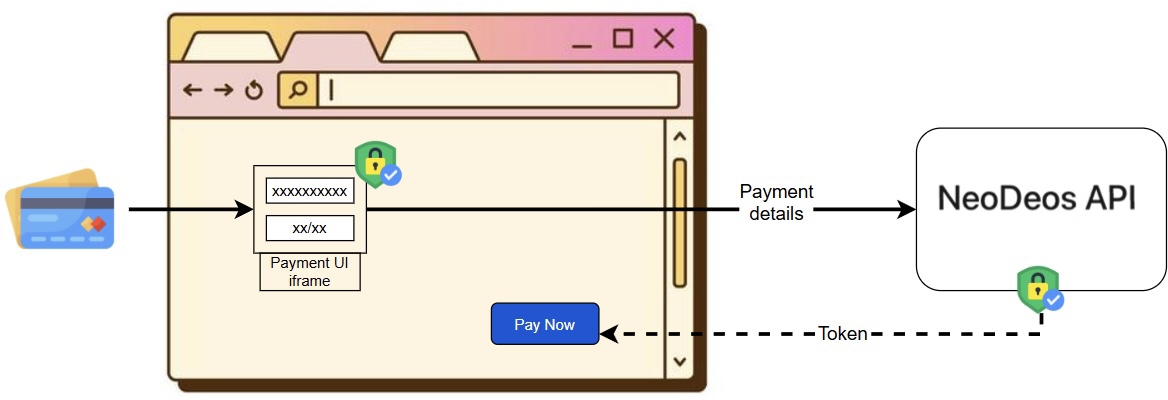
Most integrations with NeoDeos begin by using the Client SDK to securely convert payment data into a token. This ensures that sensitive data is transmitted directly from the user’s browser to NeoDeos. The SDK will automatically insert the payment token into the form as a hidden field. When your form is submitted to your server, the token can be used for secure server-side payment processing.
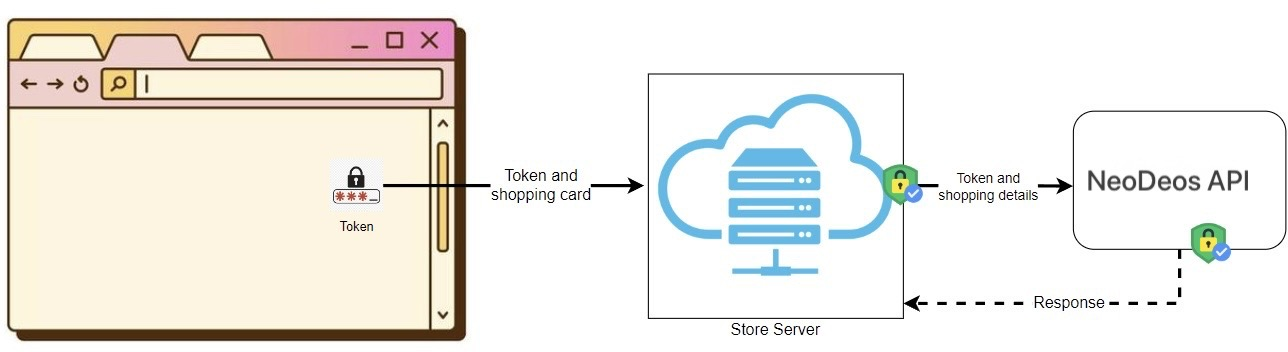
Once the form is submitted with the token, your backend can use it to create a payment using the NeoDeos API.
For deeper implementation examples, see the guides below:
- Accepting a payment
- Creating a customer
- Accepting a payment for a customer
- Search for transactions
- Search for customers
Access Control
To authenticate with NeoDeos, send your Secret Key in the HTTP header.
You can retrieve the key from your account settings. Include it in the header as x-secretkey.
If you're working with the Client SDK, you'll also need to provide a provider token for each integrated provider.
Go Live Setup
When you're ready to move to the live environment, make the following updates:
- Update your API base URL to: https://api.neodeos.com
- Use your production Public Key (starts with
pubprod) and Secret Key (starts withsecprod) - Set the environment to
"production"in the Client SDK
Setting Up 3DSecure
3DSecure adds an extra layer of authentication for secure transactions.
To configure 3DSecure:
-
Set up 3DSecure: You can turn this on globally or for specific transactions as needed.
-
Configure Routing Conditions: You can define 3DSecure rules based on transaction attributes like currency or amount range, allowing detailed control over when 3DS is triggered.
See the full guide here: 3DSecure Configuration Documentation